Case study
AWS CodeCatalyst
A revolution in collaborative software development — improving report discoverability, data visualization, and configurability inside a brand-new developer collaboration platform.
- Organization
- Amazon Web Services (via Projekt202)
- Role
- Senior UX Designer (contract)
- Year
- 2021–2022
Summary
AWS CodeCatalyst, a collaboration platform for software development, faced significant hurdles around report discoverability, data visualization, and configurable reports during its beta testing phase.
As a contracted UX designer from June to December 2021, I took ownership of the user experience for a specific feature set, tackling these challenges head-on. I was instrumental in the creation of a centralized report page, an improved navigation system, and an intuitive interface for defining success criteria for key quality metrics such as test report metrics, branch and line coverage, and code coverage.
Despite organizational restructuring, our team’s collaborative efforts ensured the successful completion of the project. Even though the official launch at re:Invent happened in November 2022, a year beyond the initial target, the platform is now enhancing the productivity and efficiency of software development teams globally. This project further emphasized the importance of customer-centric design, cross-functional collaboration, and iterative testing in my UX design practice.
What is AWS CodeCatalyst?
AWS CodeCatalyst is a cloud-based collaboration platform that provides software development teams with all the tools needed to build applications of all types. This platform provides teams with task management, issue tracking, plan management, code collaboration, code management, and CI/CD build, test, and release automation tools for organizing work, managing code, and automating team CI/CD workflows. With AWS CodeCatalyst, teams can easily integrate with and leverage AWS resources for their projects. The platform structures resources inside projects that live inside spaces, and provides language or tool-based project blueprints to help teams get started quickly.
Here’s a video about AWS CodeCatalyst during re:Invent on Nov 2022.
Challenges
Big tech companies like Amazon understand the importance of productivity and efficiency in software development. To meet this demand, they invest in tools like AWS CodeCatalyst, a platform that brings together all the necessary tools in one place for software development teams.
During beta testing, we encountered three key challenges that needed to be addressed.
- Discoverability: Accessing test reports was a challenge as the current navigation buried the reports deep within AWS CodeCatalyst, requiring 6 to 10 clicks to reach a single report page.
- Meaningful data visualization: The quality metrics of each report were unique and could not be simply aggregated to provide insights into code quality.
- Configuring reports: The software development process needed to be enhanced by allowing both manual and automatic report configuration. There was no way to set success criteria to put in place quality gates before the code goes to production.
Addressing all these challenges would potentially revolutionize the software development process, resulting in increased productivity and efficiency.
Organizational challenges
It is also worth mentioning that one of the biggest challenges I faced during this project was the restructuring of the organization. This caused changes in timelines, resources, and priorities, which impacted the project’s progress. Despite these obstacles, I was able to adapt and collaborate effectively with the new teams and stakeholders to successfully deliver the solution within the specified timeframe.
Approach
As part of the UX design process, I conducted the following activities:
- Stakeholder interviews: Engaged with stakeholders to gather business requirements and understand their needs and expectations for the project.
- Lightweight competitive analysis: Conducted a lightweight analysis of competitors to understand industry trends and best practices.
- Requirements gathering: Conducted research on the industry and IT space to gather requirements and inform the design process.
- UX meetings: Facilitated UX design meetings to align with stakeholders and create a shared understanding of project goals.
- High-fidelity design: Created high-fidelity design artifacts, such as wireframes and prototypes, to communicate and validate design solutions.
- User testing: Conducted usability studies and user acceptance testing to evaluate the usability and effectiveness of the design.
- UX audits: Performed UX audits to identify and address any potential roadblocks and pain points in the user experience.
- Presentation: Developed a clear and compelling presentation to communicate design solutions and secure stakeholder buy-in.
Key insights
Solution
To improve discoverability, these are the two solutions I created:
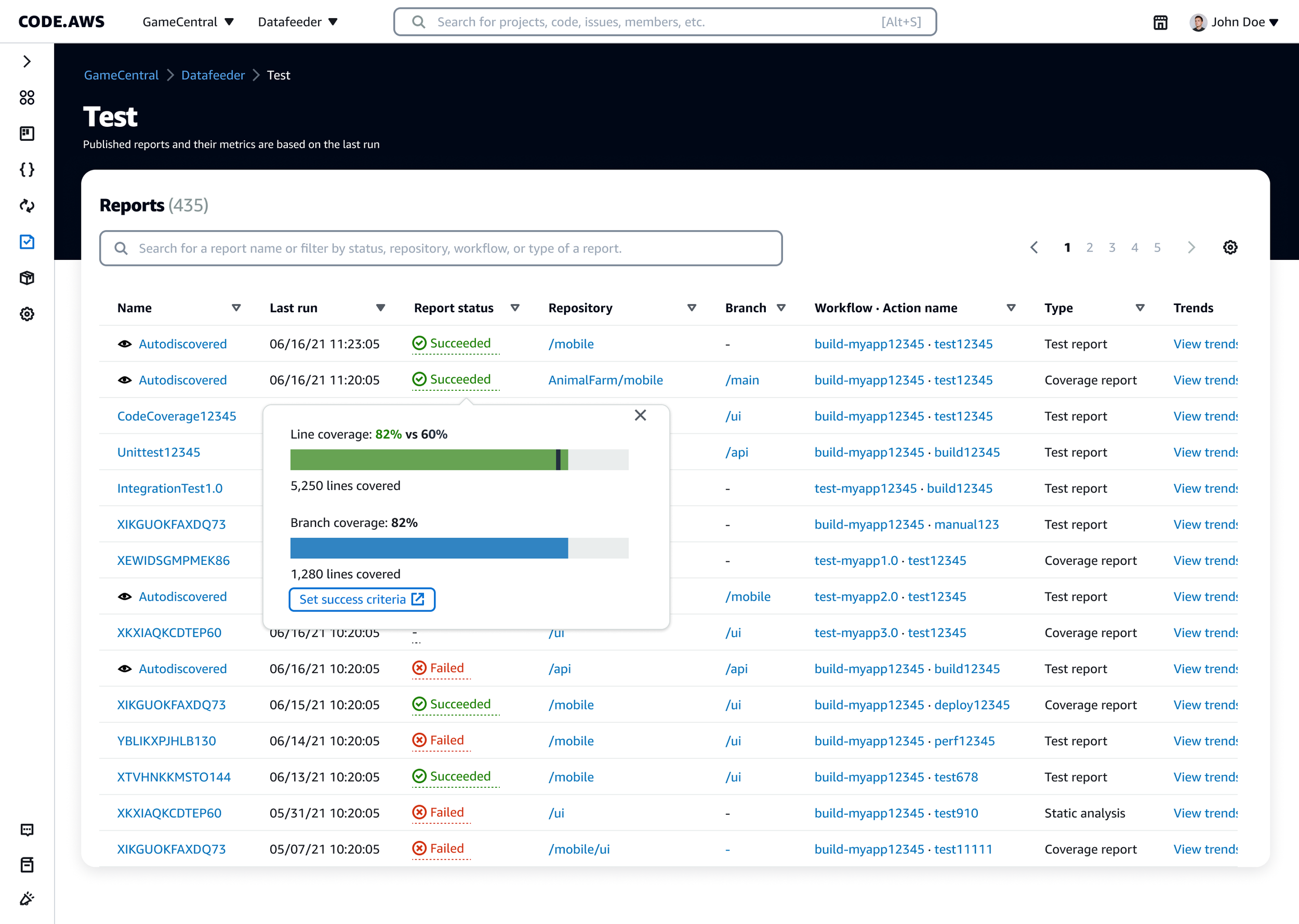
A] A central location for all reports. I designed a centralized Reports page to improve report discoverability. The page showcases a table listing the names of all reports, along with their status, metadata, and metrics. This solution eliminates the need for users to navigate through multiple levels of the workflow to find reports, offering quick and convenient access to the information they need.
B] Supplementary navigation options. I utilized the main side navigation as the main entry point to the Reports page. This streamlined the process and made it easy for users to access the reports. I also worked with other design owners and product teams to create contextual navigation options. This included creating a direct route from Workflows, Projects, and even Pull Requests to the Reports page, making the information more easily accessible and reducing the time it takes for users to find what they need.
 Navigational paths
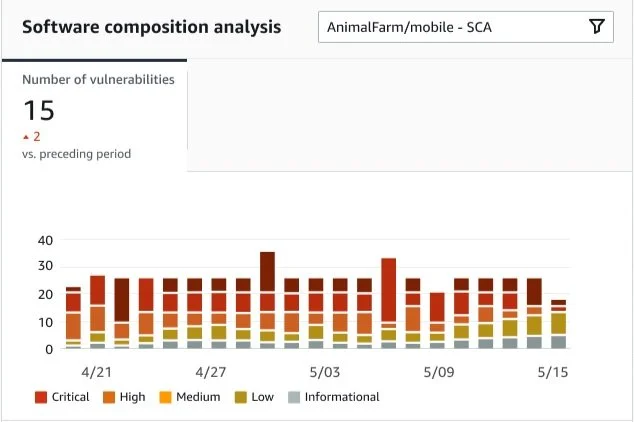
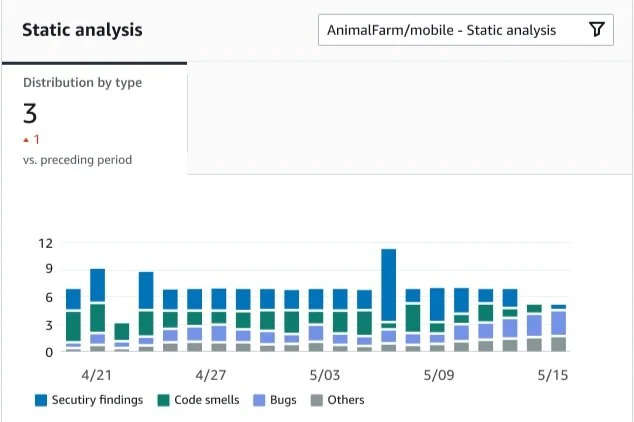
To provide meaningful insights into the quality metrics of each report,
I created a data visualization that helps users spot patterns and issues. I also designed widgets that showed historical trends.
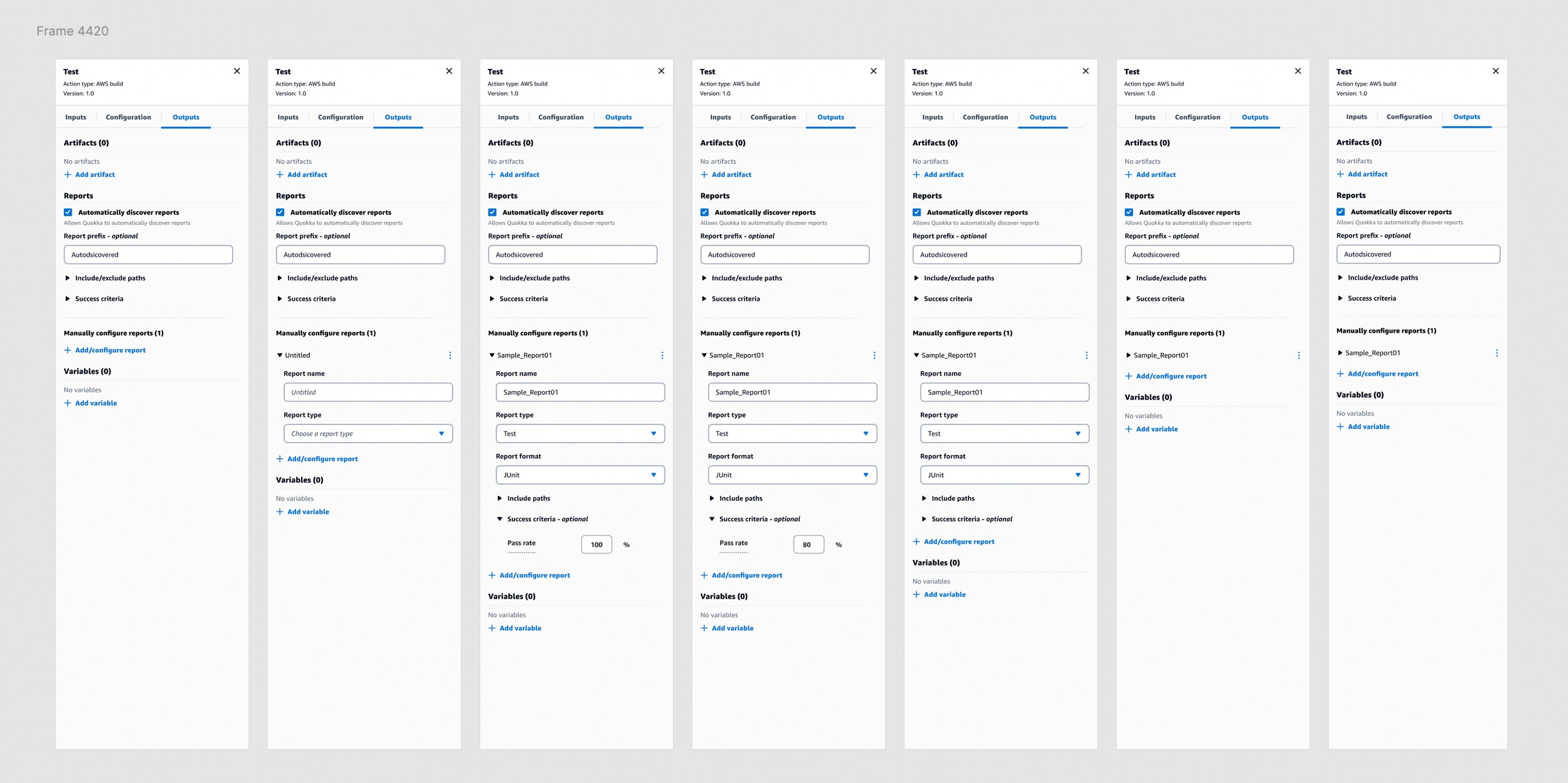
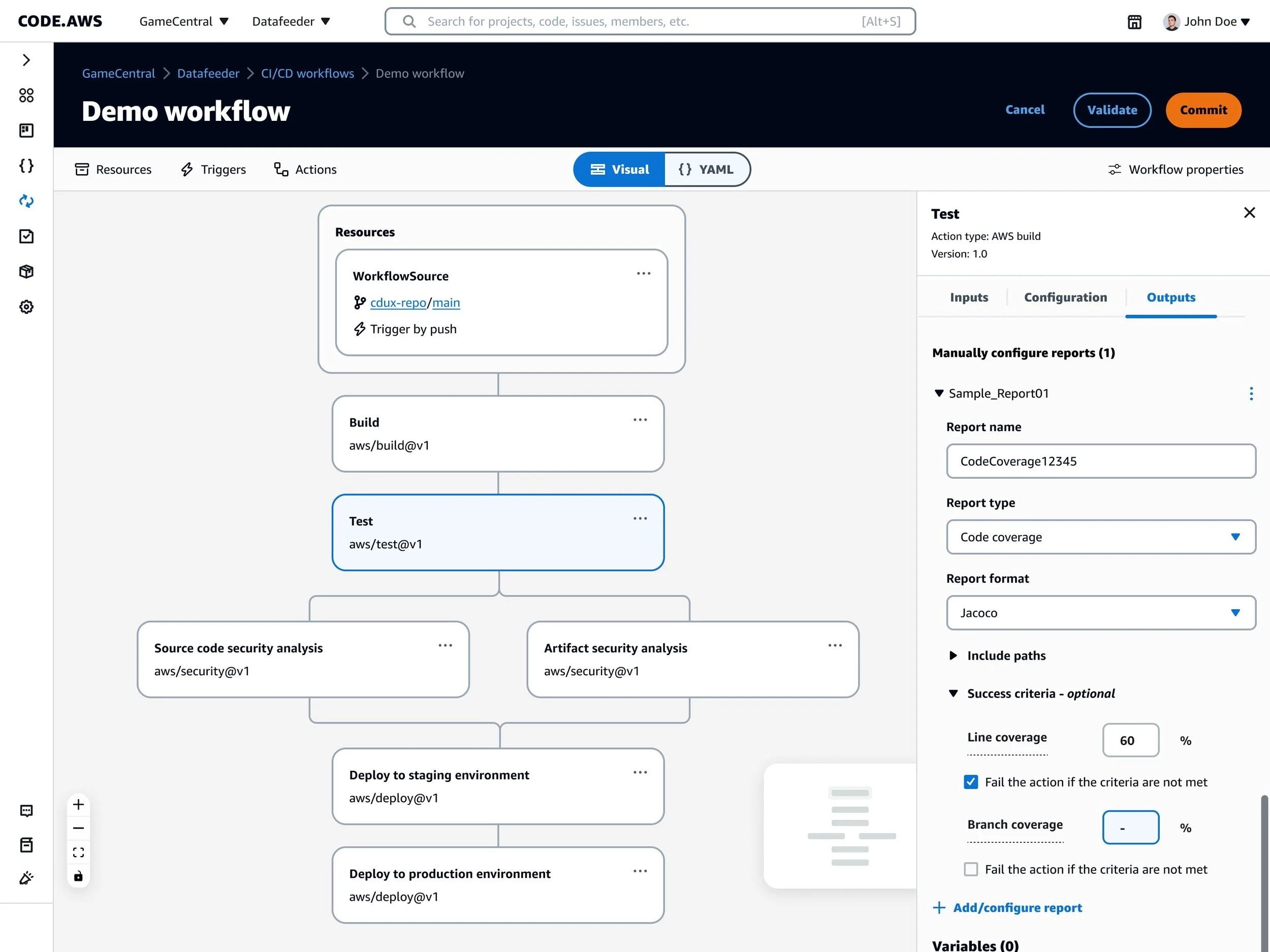
To set success criteria for each quality metric,
I designed an interface that allows users to define success criteria and view the status of a report based on the defined success criteria. Users have the ability to configure reports manually as well as set auto-discovery.
Results
As a key contributor to the AWS CodeCatalyst project, I was instrumental in creating a comprehensive solution to improve the software development process and increase productivity and efficiency. The solution was launched in November 2022 during re:Invent and is now available in the market, helping software development teams deliver quality software quickly and confidently.
Reflections
The project was a great learning experience for me as it gave me the opportunity to understand the importance of addressing the challenges faced by software development teams. Through stakeholder interviews and market research, I gained a better understanding of the needs of the customers and was able to design a solution that was not only effective but also user-friendly. One of the key takeaways for me was the importance of data visualization in providing meaningful insights. This project also taught me the significance of making the user journey seamless and simple.
Looking back, I realized that involving the UX team and conducting usability studies were crucial in ensuring that the solution met the standards and was effective in improving the software development process. Additionally, collaboration with different teams, including product owners and designers, was crucial in ensuring that the solution was consistent and met the project’s goals and objectives.
Overall, this project helped me grow as a designer and reinforced the importance of understanding the customers’ needs, collaborating with other teams, and continuously testing and improving the solution.
To learn more about the platform, see AWS CodeCatalyst on aws.amazon.com.